| Description | Keyboard Key | Notes |
|---|---|---|
| Add a new window or tab | c | |
| Close a window | & | |
| Switch between windows/tabs | (the number that appears on bottom inside a green box) | |
| Add a new pane | Vertical Split: % Horizontal Split: " | |
| Move a pane | { : Move to left } : Move to right | |
| Close a pane | x | |
| Navigate between panes | (Use Arrow Keys) | |
| Enable Scroll Mode and Copy Mode | [ | To make it permanent, add set -g mouse on on to your ~/.tmux.conf file |
| Paste Mode | ] | Let’s you paste the text copied from using [ |
Attach and Detach tmux sessions
Ctrl-B + d : Detach from a tmux session without closing it. The session lives in the background.
tmux attach : Attaches back to the last detached tmux session.
tmux Plugins
Plugins are managed by TMUX Plugin Manager aka TPM
To setup TPM, first clone it:
git clone https://github.com/tmux-plugins/tpm ~/.tmux/plugins/tpm
Put this at the bottom of ~/.tmux.conf
set -g @plugin 'tmux-plugins/tpm'

set -g @plugin 'tmux-plugins/tmux-sensible'
Initialize TMUX plugin manager
Keep this line at the very bottom of tmux.conf
run '~/.tmux/plugins/tpm/tpm'
Then, reload config file: tmux source ~/.tmux.conf
And install the new plugins: prefix + I (that’s a capital I for Install)
Key Shortcuts for Managing Plugins
prefix + I: Installs new plugins from your list and refreshes the environment.
prefix + U: Updates all currently installed plugins
prefix + alt + u: Uninstalls plugins that are no longer on your list.
Copying-Pasting in/from tmux
To copy-paste within tmux: prefix-[ , then highlight text, then prefix-] to paste that text.
To copy text to host computer clipboard from a tmux session: Shift , then highlight text, then right-click > Copy
Advanced movesss
Full width horizontal window split
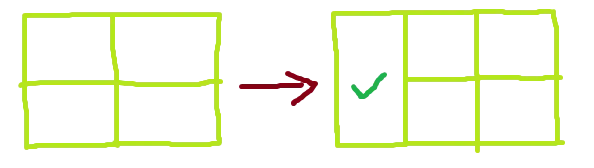
tmux split-window -hfb
-h : split window horizontally
-f : full window length
-b : split before the currently active/selected pane. By default it’s split after if -b not provided