Imagine having your quick reference notes that you can pull up right on your terminal? Forgot that flag for curlto download a file from a redirected page? Or how to view the processes in Linux in tree format?
I’m aware of tools like cheat.sh, tldr.sh and terminal AI agents, but personally I like referencing my own notes with my own little quirks and quarks of note taking.
What if I host my reference notes on a Git repository (no sensitive or personal data, mostly command line ). Clone it to a folder on my workstation. Use a tool like ripgrep to search through the notes and list suggestions, and fzf to quickly traverse through them (using cursor or arrow keys) with a live preview pane on the right to find what I was looking for? This is what I put together in a bash script.
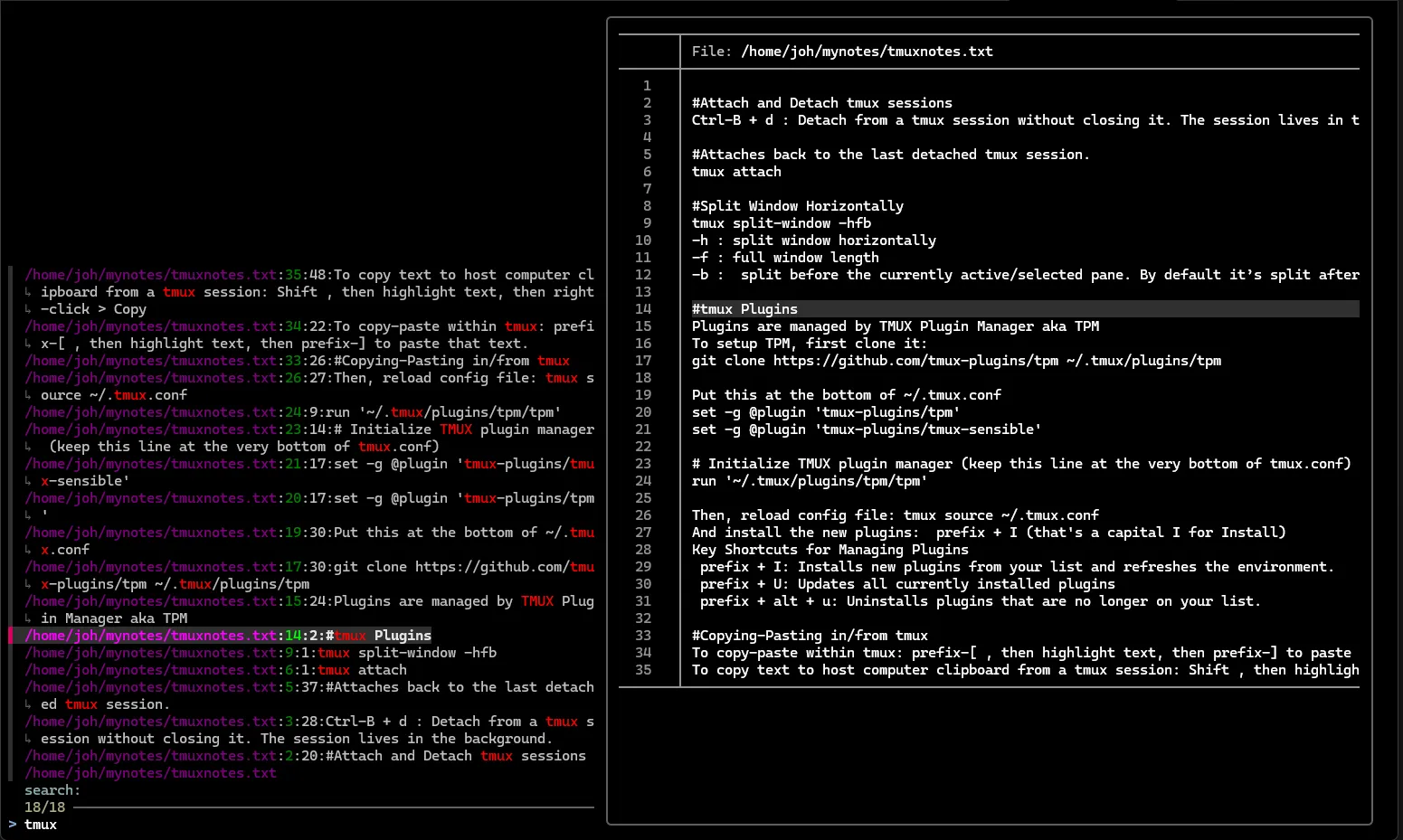
Below is a bash script I put together in a few days. I’m pretty sure I can improve it.
#!/usr/bin/env bash

set -eEuCo pipefail

bannerText="Your Peronal Quick reference notes"
rootSearchDir=/home/joh/mynotes

export bannerText
export rootSearchDir

ripgrepSearch() {
        declare -r query=$1
        if [[ -z "${query// }" ]]; then
          echo "$bannerText"
        else
                exec rg --files $rootSearchDir --color=always --no-messages | rg --no-messages --ignore-case "$query" || true
                exec rg --column --line-number --no-heading --smart-case --color=always --no-messages --ignore-case "$query" $rootSearchDir || true
        fi
}

export -f ripgrepSearch

batPreview() {

				# the below code to show preview with the search query line highlighted came from:
				# https://github.com/sharkdp/bat/issues/388
        declare -r file=$1
        declare -i -r line=$2
        declare -i -r lines=$LINES

        if [[ -z "$3" ]]; then
            echo -e "\n\n\n\n\n\n\n\n\nPerview Pane"
            return 0
        fi

        if [[ -z "$1" ]]; then
            echo "Welp ...could'nt find anything.... ¯\_(ツ)_/¯"
            return 0
        fi

        declare -i center=$(( (lines - 3) / 2 ))

        if [ $line -lt $center ]; then
            center=$line
        fi
        declare -i -r start=$(( line - center ))
        declare -i -r end=$(( lines + start ))

        exec batcat --color always --highlight-line $line --line-range $start:$end --paging never --wrap=auto --terminal-width=160 "$file"
}

export -f batPreview

echo "$bannerText" | fzf --ansi \
        --disabled \
        --wrap \
        --delimiter ':' \
        --header "search:" \
        --bind "change:reload(ripgrepSearch {q})" \
        --preview "batPreview {1} {2} {q}" \
        --preview-window 'right:70%' | cut -d ":" -f 1 | xargs batcat --paging=always
Tools used
ripgrepto search through the notesfzfto traverse through ripgrep’s output listbatcatto preview the notes on the sidebashto put everything together
How everything works
Fzf is the connector tool that pulls in functionalities from other tools to build this nice note reference tool on terminal. You can do function calls from within fzf which makes this possible.
The --bind option triggers a function call to ripgrepSearch function on every key change. The function then runs ripgrep against my notes and spits out a list of suggested search result.
Here is where you traverse through the list on screen using arrow keys to highlight.
--preview calls another function that runs batcat to show a preview of the your highlighted option from above.
When you hit enter on your highlighted option, you’re now completely handed over to a text viewer.
final thoughts..
I like to keep my reference notes crisp and short. Might expand a little on some topics that require frequent refresh for my memory. Only included information to get things done and the detailed research materials I keep to keep them in my main note taking app.
To edit and add more notes, I can clone the repo, connect to the repo and push those changes.
When I make further changes to the script, I’ll host it on a GitHub repo.
next steps
- Check if fzf and batcat is installed on workstation, if not install
- Thinking of replacing batcat with a markdown text viewer like https://github.com/charmbracelet/glow , just so I can have bold headings and code highlights. Nothing fancy. Aim is to keep things simple and fast to refer.